points is how many tips it has. radius reaches to the tips. inner is how far in the notches go: a small inner makes a sharp star, a big one makes a fat star.
The first two numbers can be written without names: star(8, 30).
A text is a picture like any other: you can colour it, repeat it, turn it and arrange it. Strings and symbols become the same picture with to_art, so "hello".to_art is text("hello").
size is the height of the letters. font is the name of a font, such as "serif". Leave it out to use the page's usual font.
Each point is [x, y]. x grows to the right and y grows downwards, like on a screen, so [40, -30] is to the right and up.
An open path is a black line. With closed: true the last point joins the first and the shape is filled. With smooth: true the corners become a smooth curve.
The path is centred on its own bounding box, so it lines up with other shapes. With no points, you get a small example line.
A leaf shape that starts at the centre and grows straight up.
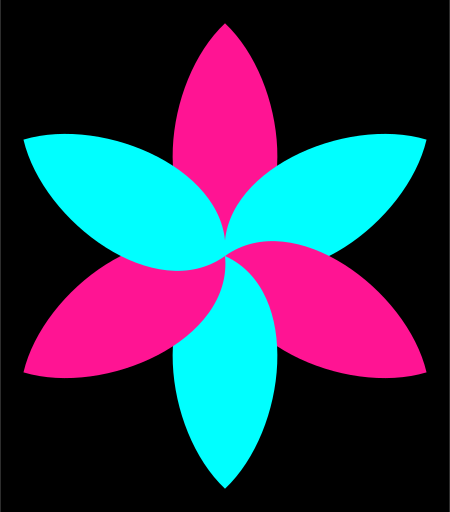
Unlike the other shapes, a petal is not centred: its base is at the centre of the picture. That is on purpose. Rotate copies of it around the centre and you get a flower:
Say where to, not how to count: right, left, up, down. You never think about which way y goes.
A picture alone on the screen is always fitted to the middle, so moving it by itself shows nothing. Moving matters when there is something else to compare with, or when you will turn it around the centre (see rotate).
Angles are degrees. rotate(90) is a quarter turn. To write a turn, use 0.25.turn, which is 90.0.
Turning happens around the centre of the picture, the point where a fresh shape sits. So if you move a shape off the centre first and then rotate it, it swings around the centre. That is how petal and in_fan make a flower.
Paint a picture, with one colour, several, or a gradient.
A colour is a CSS colour name as a symbol (:crimson, :navy, :skyblue), a string such as "#ff0066", or the result of hsl or gray. With no colour at all you get :crimson.
Pictures are black by default, on a white page. If you paint the same picture twice, the later colour wins. A colour given to a whole group does not overwrite colours given to pictures inside it.
For a gradient, name where it starts and where it ends: colored(from: :gold, to: :crimson). It runs from the top to the bottom. angle: turns the direction, in degrees clockwise: angle: 90 runs from the right to the left. around: true runs from the centre outwards. If you leave out from, it starts at crimson; if you leave out to, it ends at navy.
On a group, the gradient flows once across the whole group, not once per picture. The colours inside the group give way to it. The gradient belongs to the picture: move it, turn it or resize it, and the gradient goes along.
The glow is the picture's own colour, blurred and spread outwards. Give color: to glow in another colour. size is in the same units as the picture. You can write it without its name: glowing(8).
A glow needs a dark page to show: use on: :black or a dark blue. On white paper there is nothing to glow against.
The glow spills outside the picture, and the picture is fitted to the screen with the spill included. All the effect words work on motions too.
petals = petal(40, 16).repeat(8).in_fan.colored(:hotpink, :gold)
show petals.glowing, on::black
amount is in the same units as the picture. You can write it without its name: blurred(6).
The blur spills outside the picture, and the picture is fitted to the screen with the spill included. A big blur on a few shapes makes soft light, like an aurora.
Without a name, you get :screen: where pictures overlap, the colours get lighter, like lights shining on a wall. The other modes are :multiply (darker, like inks), :overlay, :lighten, :darken, :difference and :normal (no mixing).
blended changes how a picture mixes with what is under it. So it shows only when something is underneath, and the page colour counts: :screen on a white page does nothing, because white is already as light as it gets. Use :screen on a dark page and :multiply on a light one.
A wrong mode name gets an error that lists the right ones.
red = circle(30).colored(:crimson).move(left:14)
blue = circle(30).colored(:dodgerblue).move(right:14)
show red.blended + blue.blended, on::black
down and right say where the shadow falls, blur how soft it is, and opacity how dark. The first number can be written without its name: shadowed(6) is shadowed(down: 6). Sizes are in the same units as the picture.
A shadow needs a light page to show. It makes pictures look like cut-out paper lying on top of each other.
Show a picture only through the window of a shape.
The shape is used where it is, so you can move it to choose which part shows. A number works as a round window: clipped_by(8) is clipped_by(circle(8)). With nothing, you get a round window, a bit smaller than the picture.
The shape can be anything that becomes a picture, even your own class. Combine it with a pattern, a gradient or a motion and the picture shows through the shape.
stripes = rect(10, 80).repeat(10).in_row.colored(:crimson, :gold)
show stripes.clipped_by
Put a group evenly round a circle, clockwise from the top.
Without radius, the circle is just big enough that neighbours do not touch. With facing_out: true, each picture turns so that its top points away from the centre.
You can write the radius without its name: in_ring(60). Even one picture can go on a ring: it sits at the top.
Turn each picture a little more than the one before, around the centre.
Made for petals: a picture that sits off the centre, copied and fanned out, is a flower.
over is how many degrees the fan covers. With a full 360 the pictures go all the way round. With less, they spread evenly and the fan is centred on straight up.
Put a group in a sunflower-seed spiral, from the centre outwards.
Each picture is turned by the golden angle from the one before, and moves a little further out. Without spacing, it is the size of the biggest picture.
Without over, the area is chosen from how many pictures there are and how big they are. over: 200 is a 200 by 200 square. over: [300, 100] is 300 wide and 100 tall. The area is centred.
Each run looks different. But while the live view is running, it stays put: saving the file again does not shuffle the pictures. Write seed: 7 (any whole number) to get the same picture every time, on every machine.
The block gets each picture (one), how far along it is (t: 0.0 for the first, creeping up towards 1.0 for the last) and its number (i, from 0). It answers the changed picture.
The pictures stay where they are, so change_each can come before or after the arranging words. One thing to know: moving, turning and scaling happen around the centre of the whole picture. If you want each picture to turn or grow around itself, do it before arranging, as in the example.
dots = circle(6).repeat(10).change_each { |dot, t| dot.grow(to:1 + t * 2) }
show dots.in_row(gap:4)
This is the heart of asobi: treat objects as pictures, and pictures as objects.
What each thing becomes:
A number is a circle of that radius. A negative number is the same circle, as a line only. 0 is nothing.
With as: you hand over the shape, and the number says how big it should be (half of its larger side). 8.to_art(as: star) is a star of radius 8.
An array or a range turns each item into a picture and puts them in a row, with a small gap. as: goes to every item. An array of arrays is a table: each inner array is a row. A string or a symbol is its letters, like text. A hash makes one row per pair: the key's picture beside the value's picture. nil is nothing.
An array that holds something in motion becomes a motion.
You do not need to call to_art yourself to show things: show and the words on, under, beside and above ask for it for you.
Your own class only has to write a to_art method (see the last example). Add include Asobi::Art to the class when you want to call picture words directly on its objects, such as planet.rotate(20). This is like Enumerable, which asks only for each.
every is the seconds for one full turn. With clockwise: false it turns the other way.
A motion is a function from time to a picture. It has no frame counter and no memory, so the same moment is always the same picture. Motion words can follow each other: flower.spin(every: 8).pulse(every: 1). All the picture words work on a motion too: flower.spin.colored(:crimson).
The loop length of a combination is the least common multiple of the parts (or the longest part, if that would be more than a minute).
The picture itself does not turn. It travels round a circle of radius, clockwise, starting from the top. Without radius, the circle is as big as the picture's larger side.
You can write the radius without its name: orbit(40).
Give it two colours, shift_color(:navy, :gold), to go from the first to the second and back. Give it one colour, shift_color(:gold), to go from black to that colour. With nothing, it goes from black to crimson.
Make a group move one at a time, instead of all together.
Write it right after a motion word (spin, pulse, bounce and so on) on a group of pictures. Each picture does the motion a little after the one before. By default, the loop is shared out evenly, and that makes a wave.
gap is the seconds between one picture and the next. Each picture does the motion around its own centre, so a ring of dots that pulses one by one stays a ring.
one_by_one belongs right after the motion word it staggers. If you stagger two motions, write it after each of them, as in the hearts example below: one for the colour, one for the bounce.
Leave fading copies of earlier moments behind a moving picture.
The copies come from gap seconds earlier, then twice that, and so on, each fainter than the last, drawn underneath. Without gap it is a short moment, which looks good. count is how many copies. You can write it without its name: trail(10).
On a still picture it does nothing: there is no earlier moment. Each copy is a whole picture, so a big picture with a long trail makes a heavy animation.
The block gets the picture and t, which runs from 0.0 up to (not including) 1.0 and then starts again, once every seconds seconds. It answers the picture for that moment.
Use the other words inside the block. Anything they can do, your motion can do.
The picture a motion shows at one moment. Also: every, frames.
motion.at(1.5) is the still picture 1.5 seconds in. Time is in seconds, and it repeats: a motion with every of 4 shows the same picture at 0.5 and at 4.5.
motion.every is how many seconds one loop takes. motion.frames(fps: 30) is one loop as a lazy list of pictures, at 30 pictures a second.
You never need them to show a motion: just show it.
The picture is fitted to the screen, so you never have to think about the size of the window.
on: is the background colour. paper: [800, 800] shows a paper of that size (width and height) with the picture in the middle; anything that sticks out is cut off.
grain: lays a fine film grain over the whole picture, like paper or old film. grain: true is a gentle grain (0.12), and a number from 0 to 1 sets the strength: grain: 0.3. It belongs to the way the picture is shown, not to the picture, so it covers everything, background included.
If you call show several times, the last one is what appears.
Run a sketch with ruby flower.rb or asobi flower.rb and a browser opens. Save the file, and the picture changes. Press Ctrl-C to stop. A mistake in your code does not close anything: the last good picture stays, and the error is written below it, with a hint.
Move the mouse and small controls appear at the edge for a few seconds. Press c to lay the code over the picture, and r to start and stop recording a video (the browser saves the file).
width and height are the size of the smallest box around the picture. bounds is that box, with x0, y0, x1 and y1. For a motion, they cover everything it shows over one loop.
shape = star(radius:20)
showtext("#{shape.width.round(1)} x #{shape.height.round(1)}", size:12)
 asobi